 Speaker Platform
From call for speakers to the final programme, in one platform.
Invite speakers, collect their profiles, disclosures and session proposals, review them with your committee, schedule rooms by drag and drop, and export the final programme. Built for the FDI World Dental Congress and in use every year since 2020.

Splash Awards Switzerland 2020Winner, Community Value · Runner-up, Tools & Apps
One path for every speaker, from invitation to booklet.
Each congress is its own workspace. Speakers only see the events they are invited to, and your team always sees where each one stands.
The speaker opens their personal link, accepts the invitation and sets a password. They land on their dashboard with the topics you suggested, ready to complete their profile and submit.
Hover the video to play
Invite
Import speakers from your CRM or contact list, suggest topics, and send personal invitation links. Speakers accept or decline in one click.
Collect
Speakers complete their profile, photo, biography and conflict-of-interest disclosure, then submit their session proposals before the deadline.
Review
Your committee accepts, declines or asks for corrections. Completeness indicators show what is still missing for each speaker.
Schedule
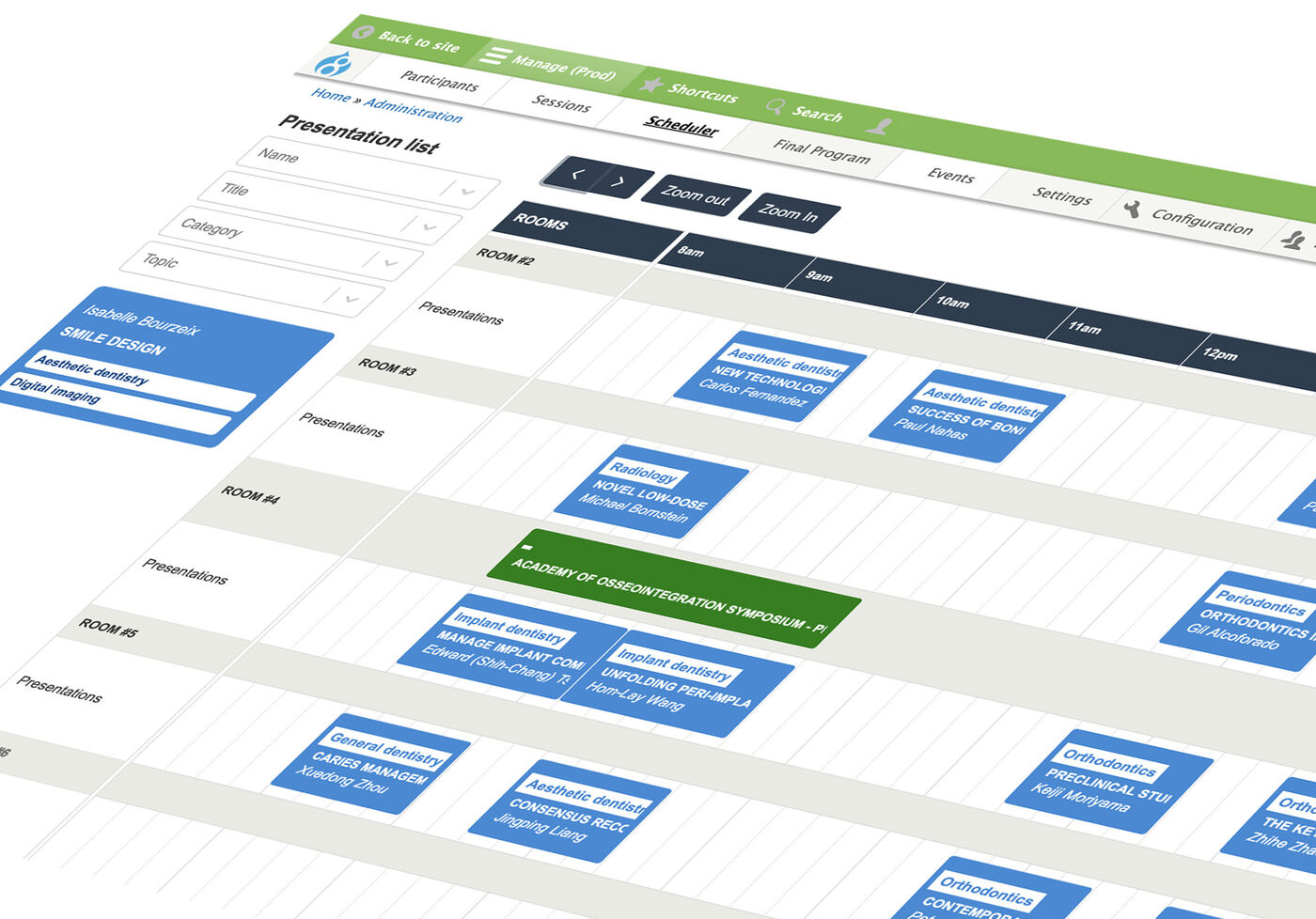
Drag accepted sessions into rooms and time slots. The scheduler blocks clashes and keeps breaks free.
Publish
Export the final programme, plus speaker, keyword and disclosure indexes and CSV files.
Build the whole congress grid by drag and drop.
Programme teams used to juggle spreadsheets for weeks. Here they drag a session into a room and the platform checks the rules.
- One session per room and time slot.
- A speaker cannot be in two rooms at the same time.
- No sessions during breaks.
- A warning when two sessions of the same category overlap.
- Multi-sessions group several talks under one chair, with credits added up.
- 2
- Day of the congress
- B
- Time period
- 3
- Room
Everything the programme team handles, in one place.
One workspace per event
Run several congresses side by side. Members, sessions, rooms and profiles stay separate, and a switcher in the header moves between them.
Personal invitation links
Each speaker gets a secure link with the topics you suggest. Accepting sets their password; declining notifies your team with their message.
Speaker dashboard
Speakers see their events, profile status, contract and proposals, with the room and time once a session is scheduled.
Session workflow
Suggested, proposed, corrections needed, accepted or declined. Character limits, learning objectives and per-session edit deadlines keep proposals print-ready.
Conflict-of-interest disclosures
Per-event policy attestations and up to ten financial relationships per speaker, required before they can submit.
Contracts and agreements
Upload one contract per event, or generate a personalised PDF agreement for each speaker and attach it to the invitation email.
Email templates and mailings
Write templates with personal fields, tag them by congress, send to a selection of speakers and resend from the mailing log.
Lists, bulk edits and exports
Filter speakers and sessions, change status or room for many at once, and export CSV files or a ready-to-paste email list.
Final programme export
One page with the full programme for the booklet, with chairs, credits, learning objectives and speakers, plus indexes.
Speaker evaluations
Record participant and committee scores per speaker and export them for the next year's selection.
Roles for every team
Editors manage everything. Viewers get read-only access to participants, sessions or the scheduler, scoped to one event.
GDPR and audit trail
Consent records with date and IP, profile revisions, user change history and anonymised database exports.
See every speaker's status at a glance.
- Invite, remind and follow up in bulk
- Spot missing photos, bios and disclosures
- Schedule and export without spreadsheets
One link, one dashboard, clear deadlines.
- Accept the invitation and set a password
- Submit proposals within the limits
- See status, room and time as they change
Read-only access to what they need.
- Review sessions per event
- View participants or the scheduler only
- Export what their role allows
Works with the CRM and website you already have.
Speakers and events come from your CRM, and statuses go back to it automatically. The programme is available as data for your website or congress app.
FDI World Dental Congress
FDI World Dental Federation represents more than one million dentists worldwide. Its annual World Dental Congress moves to a new country every year. The speaker system it used before was built on an unmaintained Microsoft stack and was shut down in 2019.
Happy Coding rebuilt the process from scratch with FDI's congress team: invitations from the CRM, speaker dashboards, the scheduler and the booklet export. The platform has run every congress since.
- Since
- 2020, Drupal, React and CiviCRM
- Scale
- Up to 38 rooms and 300 presentations per congress
- Built in
- 12 months, 1,500+ hours, open source under GPLv2
Planning your next call for speakers?
We will walk you through the platform with your own event in mind, from invitation to the final programme.